
How to Place a Bulk Laptop Order in India: A Step-by-Step Guide for Businesses

You've just received a message from HR. Thirty new employees are joining next month and they all need laptops.
Finance wants a quotation. IT wants consistent specifications. HR wants everything delivered before the joining dates.
And someone needs to make sure the laptops actually work when they arrive.
This is where a bulk laptop order in India becomes more than simply finding a supplier with enough stock.
For growing businesses, ordering laptops in bulk involves planning employee requirements, comparing hardware, checking suppliers and coordinating delivery. Miss one of these steps and your IT team could spend the next few weeks managing delays or fixing avoidable problems.
The good news? The process doesn't have to be complicated.
Here's how to approach a bulk laptop purchase, from the first requirement to the final employee handover.
What Is a Bulk Laptop Order?
A bulk laptop order involves purchasing multiple laptops together for a business, institution or organisation.
Companies commonly place bulk orders when they are:
- Hiring new employees
- Setting up an office
- Expanding departments
- Replacing ageing hardware
- Equipping remote teams
- Opening new branches
- Arranging laptops for training programmes
Unlike buying one or two laptops, a larger order requires attention to configuration consistency, supplier inventory, warranty coverage and delivery schedules.
For example, if you're buying 50 laptops for a customer support team, you probably don't want 15 different processor generations and five different charger types.
You want devices that meet the same requirements and are easy for IT to manage.
Step 1: Finalise Your Laptop Requirements
The first step happens before you contact a supplier.
You need to understand exactly what your employees require.
Start With Employee Roles
Don't assume everyone needs the same laptop.
A sales executive using CRM software and video meetings has different requirements from a developer working with multiple applications.
A practical starting point is to group employees by workload.HR & Administration: Email, documents, recruitment tools | 8-16 GB RAM, SSD
- Sales & Marketing: CRM, presentations, video calls | 16 GB RAM, SSD, webcam
- Finance: Accounting, spreadsheets | 16 GB RAM, SSD
- Customer Support: Browser-based tools, communication | 8-16 GB RAM, SSD
- Developers: Coding, testing, multitasking | 16-32 GB+ RAM
- Creative Teams: Design, video editing | Workload-specific CPU, RAM, graphics
Note: Final specifications depend on software and workload requirements.
Confirm Your Quantity
Ask HR for the confirmed hiring schedule.
Then check whether IT already has suitable spare laptops.
If you're onboarding 30 people but have five ready-to-use devices, you may only need 25 additional laptops.
It's a simple check, but it can prevent unnecessary purchases.
Step 2: Decide Between New, Refurbished and Rental Laptops
Once you know what employees need, decide how the company should procure the devices.
Buying new isn't the only option.

New Laptops
New laptops may be suitable when employees need the latest processors, specialised configurations or manufacturer-specific support.
They generally involve higher upfront expenditure.
Refurbished Laptops
Professionally refurbished laptops are previously used devices that have been inspected, tested and prepared for resale.
For standard business workloads, refurbished Dell Latitude, HP EliteBook and Lenovo ThinkPad models can be worth considering.
Businesses can explore refurbished laptops when looking for cost-efficient alternatives to new devices.
However, check processor generation, battery condition, hardware testing and warranty before ordering.
Rental Laptops
What if your company needs 40 additional laptops for a six-month project?
Buying permanent hardware may not be necessary.
In this situation, rental could make more sense.
Compare the complete rental cost with the purchase price and expected future use before deciding.
Step 3: Prepare a Clear Bulk Laptop Requirement
A vague enquiry usually leads to a vague quotation.
If you simply tell a supplier, "We need 50 laptops," you'll probably receive options with different processors, RAM, storage and prices.
That makes comparisons difficult.
What Should Your Requirement Include?
Prepare a short procurement brief with:
- Number of laptops required
- Preferred brands or models
- Minimum processor generation
- RAM requirements
- SSD capacity
- Operating system
- Display size
- Battery requirements
- Cosmetic condition, if refurbished
- Warranty expectations
- Delivery location
- Required delivery date
If your employees work in different cities, mention that upfront.
For example, a business may need 20 laptops in Gurugram, 15 in Bengaluru and 10 in Pune.
That affects delivery planning and potentially after-sales arrangements.
Example of a Bulk Laptop Requirement
Quantity: 40 laptops
Use: General office work, CRM and video meetings
Processor: Windows 11-compatible Intel Core i5 or equivalent
RAM: 16 GB
Storage: 512 GB SSD
Display: 14-inch Full HD preferred
Warranty: Written hardware warranty required
Delivery: One office location in Delhi NCR
Timeline: Before employee onboarding
This gives suppliers enough information to recommend comparable options.
Step 4: Find a Supplier That Can Handle Bulk Orders
A supplier offering a good price on five laptops may not have enough inventory for 50.
That's why businesses should evaluate suppliers differently when purchasing in volume.
Check Inventory Availability
Ask whether the required quantity is currently available.
If identical models aren't available, request details of equivalent configurations.
Ask About Hardware Testing
For refurbished devices, ask how the supplier tests:
- Processor and RAM
- Storage health
- Battery and charging
- Display
- Keyboard and touchpad
- Wi-Fi and Bluetooth
- Webcam and audio
- Connectivity ports
A laptop turning on successfully doesn't prove that every component is working properly.
Check Warranty and Support
Ask what happens when a device develops a fault after delivery.
Confirm the warranty duration, covered components, exclusions and repair or replacement process.
Check Documentation
Businesses should ask about GST invoices, serial numbers and warranty documentation.
These records help finance and IT teams manage purchases and track devices after deployment.
For larger requirements, Renew Circuits offers an enterprise procurement service where companies can discuss quantities, configurations and delivery requirements.
Step 5: Request and Compare Bulk Laptop Quotations
Now comes the part Finance cares about.
But don't choose a supplier based only on the final quotation amount.
Two suppliers may quote different prices because they're offering different devices.
Compare the Same Specifications
Suppose Supplier A offers a Core i5 laptop with 8 GB RAM and a 256 GB SSD.
Supplier B offers a newer-generation Core i5 with 16 GB RAM and a 512 GB SSD.
Comparing their prices without considering those differences won't tell you which offer provides better value.
Look Beyond the Unit Price
Check whether the quotation includes:
- Laptop configuration
- Quantity
- GST and applicable taxes
- Warranty
- Accessories
- Delivery charges
- Installation or configuration services
- Repair or replacement terms
Ask suppliers to clearly identify any additional charges.
Compare Total Procurement Value
A lower-priced order may not be the better deal if it comes with inconsistent configurations or unclear support terms.
The right quotation should balance price, device suitability, supplier reliability and after-sales support.
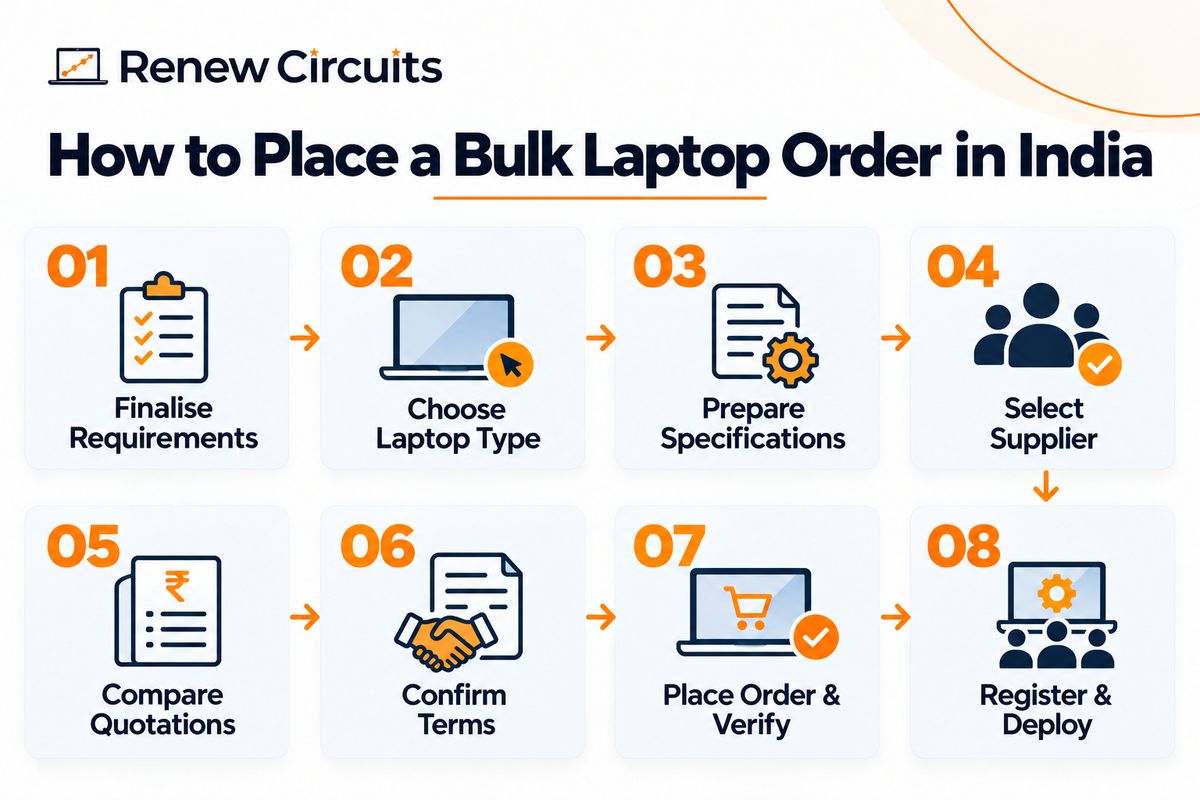
Step 6: Confirm Warranty, Payment and Delivery Terms
Before approving the order, get the important details in writing.
Warranty Coverage
Confirm:
- Warranty period
- Covered components
- Exclusions
- Claim procedure
- Repair or replacement conditions
- Support contact
Renew Circuits advertises a standard one-year warranty on its certified refurbished laptops, subject to applicable terms and exclusions. Confirm the coverage for your selected devices before purchasing.
Payment Terms
Payment arrangements vary between suppliers and orders.
Ask whether payment is required in advance or according to another agreed schedule.
Your finance team should verify the invoice, payment instructions and commercial terms before making a transfer.
Delivery Timeline
Confirm the expected dispatch and delivery dates.
If your office is in Mumbai, Hyderabad, Bengaluru, Delhi NCR or another location in India, ask about delivery coverage and any location-specific requirements.
For multi-office deployments, confirm how the shipment will be divided and tracked.
Step 7: Place the Order and Verify the Devices
Once the quotation, specifications and terms are approved, the business can issue its purchase order.
But procurement isn't finished when the payment is made.
Match Delivery Against the Purchase Order
When the laptops arrive, check that the number of devices matches the order.
Verify:
- Brand and model
- Processor
- RAM
- SSD capacity
- Operating system
- Accessories
- Physical condition
- Serial numbers
If the devices are refurbished, check the agreed cosmetic grade and available battery-health information.
Perform Basic Functional Checks
Before distributing laptops to employees, test a sample of the shipment or follow your organisation's device acceptance process.
For critical deployments, checking every device may be appropriate.
Confirm that the laptops start correctly, charge properly, connect to Wi-Fi and run the required applications.
Record Any Discrepancies
If a laptop has a problem, document it and contact the supplier through the agreed support process.
Don't wait until the device has been assigned to an employee and becomes an urgent issue.
Step 8: Register and Deploy the Laptops
Your laptops have arrived and passed inspection.
Now IT needs to prepare them for employees.
Maintain an Asset Register
Record the following details for each device:
- Asset ID
- Serial number
- Brand and model
- Processor, RAM and storage
- Purchase date
- Warranty details
- Assigned employee
- Office location
- Device status
A spreadsheet may be sufficient for a small company. Larger organisations may prefer dedicated IT asset management software.
Configure Devices Before Handover
Depending on company requirements, IT may need to:
- Install approved applications
- Configure employee accounts
- Apply security settings
- Enable endpoint protection
- Set up device management
- Check operating system updates
An employee should receive a laptop that's ready for work, not one that requires hours of troubleshooting on the first day.
Common Mistakes Businesses Make When Ordering Laptops in Bulk
Even experienced procurement teams can overlook a few things.
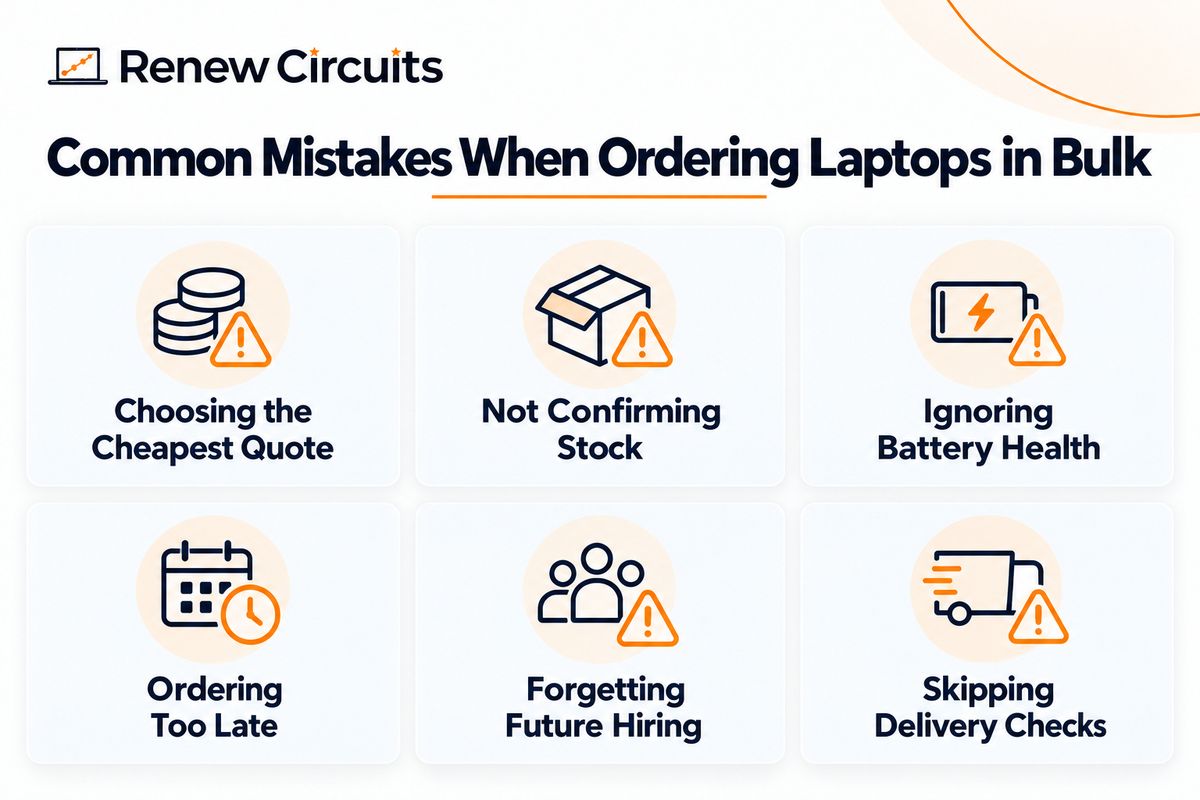
Choosing the Cheapest Quotation
A low unit price doesn't help if the devices fail to meet employee requirements.
Compare specifications, quality checks, warranty and support together.
Not Confirming Stock Availability
Don't assume that a supplier showing a model online has 50 identical units available.
Confirm stock before finalising the order.
Ignoring Battery Health
This matters especially for refurbished laptops.
Employees who travel or work remotely need devices with suitable battery performance.
Ordering Too Close to Joining Dates
If HR confirms hiring plans early, share them with IT and procurement.
Last-minute ordering limits your options and increases the risk of delays.
Forgetting Future Hiring
A company ordering 30 laptops today may need another 20 in two months.
Ask whether the supplier expects to offer matching or equivalent configurations later.
Not Checking Devices After Delivery
Never assume every unit in a bulk shipment is identical and functioning correctly.
A basic acceptance process can help catch problems before employee deployment.
How Renew Circuits Supports Bulk Laptop Orders in India
Renew Circuits supplies refurbished business-grade laptops for companies, institutions and growing teams across India.
Businesses can discuss their required quantity, preferred configurations, intended workloads and delivery locations before selecting devices.
Its bulk procurement process includes requirement collection, configuration recommendations, pricing confirmation and delivery planning.
For businesses comparing bulk laptop suppliers, this gives them a structured way to evaluate available hardware against their actual needs.
The company also advertises warranty-backed refurbished devices and pan-India delivery, with specific availability and commercial terms confirmed during the enquiry process.
Planning to purchase laptops for your organisation?
Submit your bulk laptop requirement to Renew Circuits with your quantity, specifications and delivery location to request available options and pricing.
Bulk Laptop Order Checklist for Businesses
Before finalising your order, make sure you've covered the essentials.
- Confirm employee requirements
- Calculate the number of laptops needed
- Decide between new, refurbished and rental options
- Prepare minimum hardware specifications
- Confirm supplier stock availability
- Compare like-for-like quotations
- Check battery condition and quality testing
- Review warranty coverage and exclusions
- Verify GST invoice and payment terms
- Confirm delivery timelines
- Record serial numbers and asset details
- Inspect devices after delivery
- Configure laptops before employee handover
Final Thoughts: Make Bulk Laptop Procurement Easier
A successful bulk laptop order in India starts well before you ask for pricing.
It begins with understanding employee workloads, defining suitable configurations and choosing a supplier that can meet your quantity and delivery requirements.
From there, compare quotations carefully, confirm warranty terms and check the devices before deployment.
The goal isn't simply to buy 50 laptops at the lowest price.
It's to make sure 50 employees have suitable devices that are ready when they need them.
For businesses looking to reduce hardware expenditure, professionally refurbished laptops can be worth considering alongside new devices.
Ready to equip your growing team? Request bulk laptop pricing from Renew Circuits and share your requirements with the business team.
Frequently Asked Questions
1. How do I place a bulk laptop order in India?
Start by confirming the number of devices required and their specifications. Contact a supplier that handles bulk procurement, request a quotation, review warranty and delivery terms, then place the order. Check the devices after delivery before assigning them to employees.
2. Can businesses buy refurbished laptops in bulk in India?
Yes. Businesses can purchase refurbished laptops in bulk from suppliers that support corporate procurement. Availability depends on the required quantity, models and specifications.
3. Is buying laptops in bulk cheaper than purchasing individually?
Bulk orders may qualify for volume-based pricing, but savings depend on the supplier, model, configuration and order quantity. Compare the final quotation and included services before deciding.
4. What should I check before choosing a bulk laptop supplier?
Check inventory availability, hardware specifications, quality-testing procedures, warranty coverage, GST documentation, delivery capability and after-sales support.
5. Can companies order laptops for employees in different Indian cities?
Yes, some suppliers support multi-location delivery. Businesses should confirm serviceable locations, delivery timelines, shipping charges and support arrangements before ordering.